
First of all, why is monitoring important? The single most important reason is that you want to be the first person that notices changes in a server, web application, infrastructure, database, customer behavior, security related incidents and so on.
Because in modern world, it’s always better to take action before the actual crisis.
Fixing an issue in an application these days, requires much more time and attention to detail than before. So sooner you are aware of problems, sooner you can act.
Modern websites are no longer simple digital brochures. They are business-critical systems that support customer acquisition, revenue generation, communication, and operational workflows. For IT managers, DevOps engineers, and Managed Service Providers (MSPs), website availability and security have become essential responsibilities.
Unfortunately, many organizations still rely on reactive troubleshooting. Problems are often discovered only after customers report outages, SSL certificate errors, DNS failures, or website downtime.
A proactive website monitoring strategy helps IT teams identify issues before they impact users. By continuously tracking critical components such as uptime, SSL certificates, domains, and DNS infrastructure, organizations can significantly reduce downtime, improve security posture, and maintain business continuity. Preventing downtime often is the main goal of monitoring.
In this post, we’ll explore the essential monitoring metrics, the most important monitoring tools, and best practices for building a reliable website monitoring framework.
Why Website Monitoring Matters
Website failures rarely occur without warning. Before the storm, the sky darkens.
In most cases, warning signs appear days or even weeks before a major outage:
- SSL certificates approaching expiration
- DNS configuration changes
- Domain registration nearing expiration
- Performance degradation
- Increased response times
- Intermittent availability issues
Without monitoring, these indicators go unnoticed until they become critical incidents. Let’s see an example regarding web application monitoring. Imagine you have a user that continuously enters suspicious characters in input fields or query parameters. If you’re not monitoring and your application is not well protected, you might miss a user that is trying for SQL injection vulnerability for instance and this may cause your whole database gone.
If you monitored incoming HTTP packets to find suspicious behavior, you would have known where to protect, what the attacker is focusing on and maybe take action and block the user that is not being normal. This example was just show you, a simple monitoring script can save you from disaster.
Effective monitoring enables organizations to:
- Detect issues before customers notice
- Reduce downtime and service interruptions
- Improve website security
- Ensure compliance requirements are met
- Protect brand reputation
- Simplify incident response processes
For IT teams managing multiple websites, proactive monitoring is not optional—it is a fundamental operational requirement.
Key Website Monitoring Areas
A complete monitoring strategy should cover several layers of website infrastructure. This list gives you the backbone to build your monitoring system on.
1. Uptime Monitoring
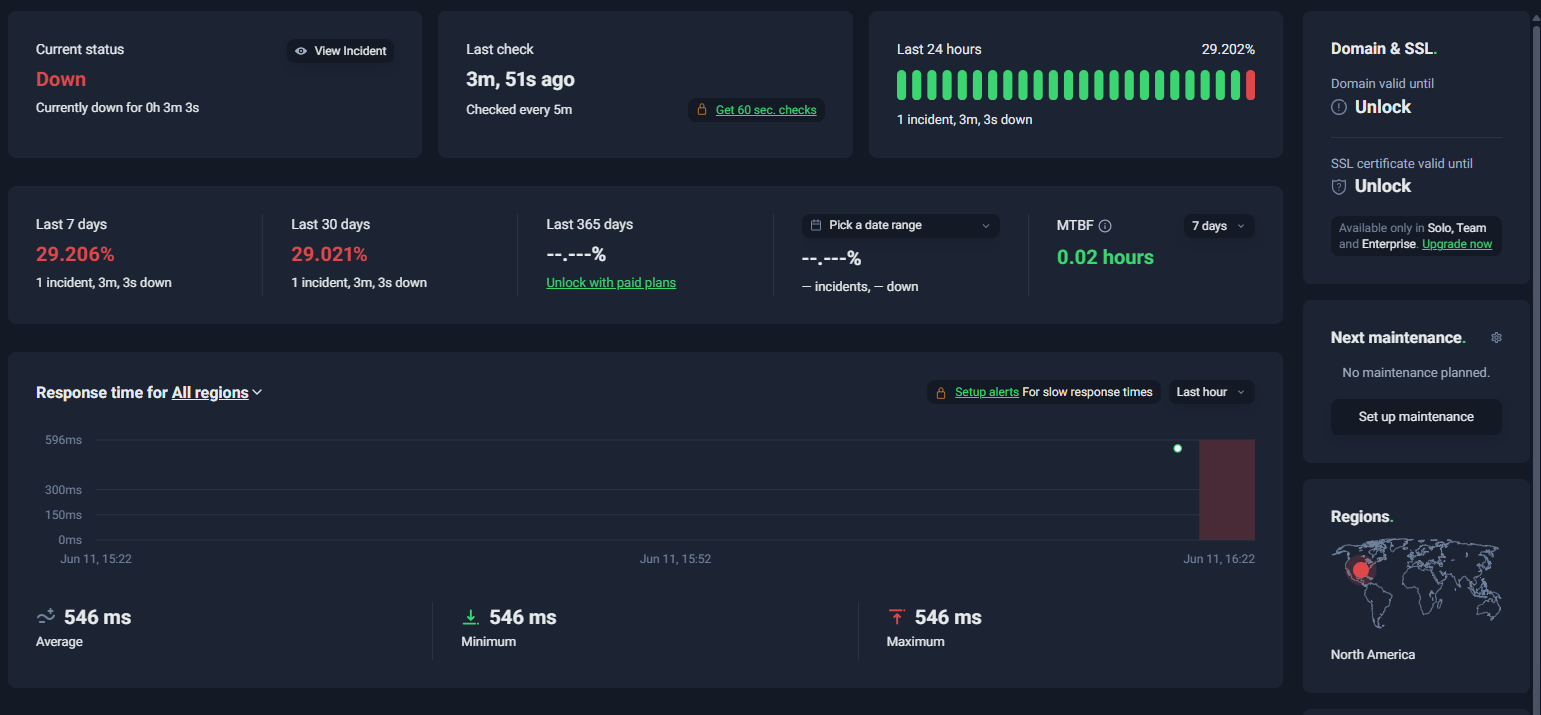
Uptime monitoring is the foundation of website observability. In performance critical application like a crypto exchange platform, even least down time can seriously hurt both users and the business.
Its purpose is simple: continuously verify that websites and services are accessible.
Monitoring systems regularly send requests to websites and measure whether they respond successfully.
Common uptime metrics include:
- Availability percentage
- HTTP response codes
- Response time
- Downtime duration
- Geographic reachability
Why Uptime Monitoring Is Critical
Even short outages can result in:
- Lost revenue
- Reduced customer trust
- SEO ranking impact
- Support ticket spikes
For business-critical websites, uptime should ideally exceed 99.9%.
What to Monitor
- Website homepage availability
- Login portals
- Customer dashboards
- APIs
- E-commerce checkout processes
- Internal business applications
Organizations often monitor from multiple global locations to detect regional connectivity problems.
2. SSL Certificate Monitoring
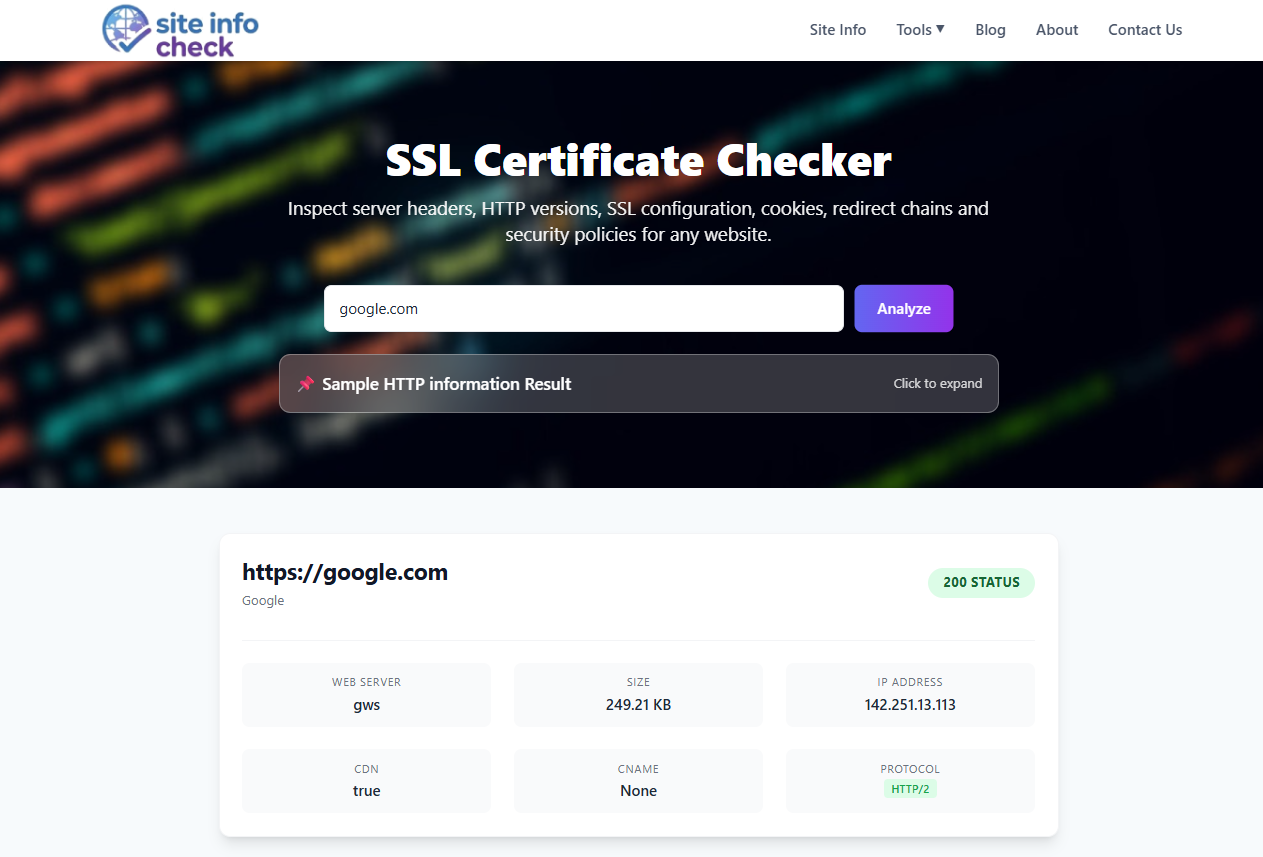
SSL certificates are essential for website security and user trust.
An expired certificate can trigger browser security warnings, disrupt customer access, and negatively impact search engine visibility. This problem is very often on assets that companies forget about or issued free SSL for. There are thousands of subdomains that companies don’t even know they exist.
Common SSL Problems
- Certificate expiration
- Invalid certificate chains
- Misconfigured intermediate certificates
- Weak encryption settings
- Certificate revocation
SSL monitoring automatically tracks certificate health and sends alerts before expiration. Also SSL expiration makes domain exposed to Man In The Middle (MITM) attacks.
Important SSL Metrics
Monitor:
- Expiration date
- Certificate issuer
- Validation status
- Supported TLS versions
- Certificate chain integrity
Many organizations choose alerts at:
- 60 days before expiration
- 30 days before expiration
- 14 days before expiration
- 7 days before expiration
This layered alerting approach reduces the risk of accidental certificate expiration.
3. Domain Monitoring
Domains are among the most overlooked infrastructure assets.
A forgotten domain renewal can instantly take websites, email services, APIs, and customer portals offline. Just so you know, when a domain expires, it does not mean that people can buy it right away, domain provider gives you time to renew your ownership, but your application associated to that domain, will go down as soon as the domain expires.
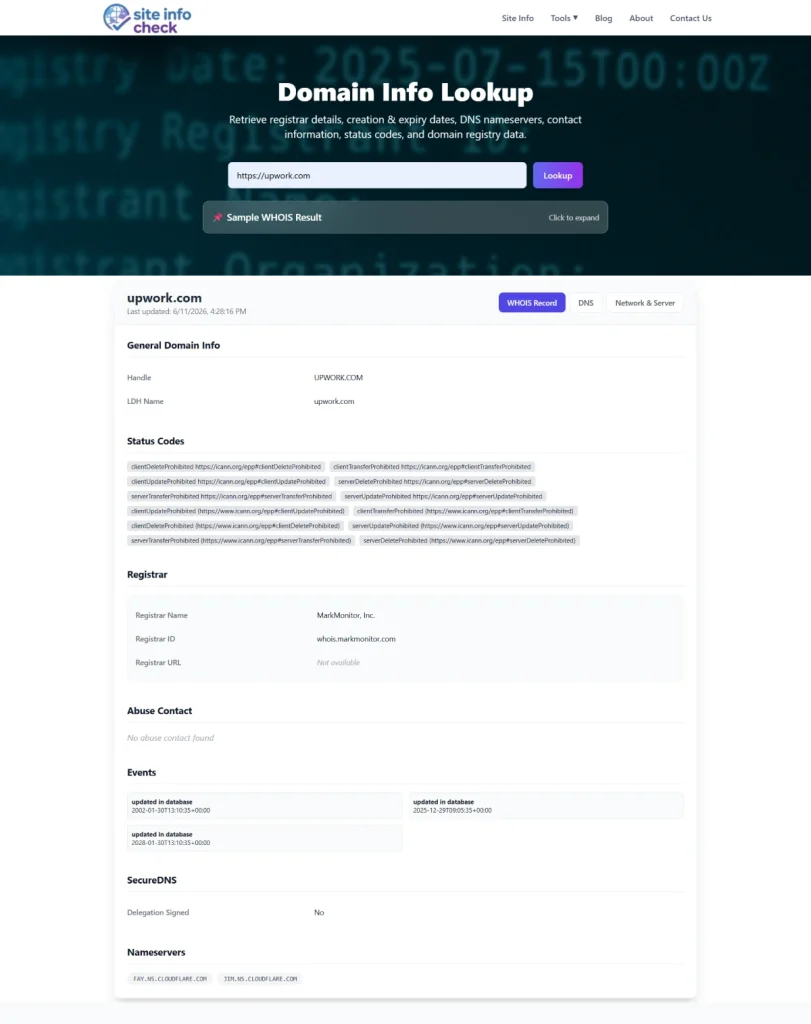
Domain Monitoring Tracks
- Domain expiration dates
- Registration status
- Registrar changes
- Ownership information
- WHOIS changes
- DNSSEC status
Risks of Poor Domain Management
Organizations frequently manage:
- Production domains
- Development domains
- Regional domains
- Brand protection domains
As domain portfolios grow, manual tracking becomes increasingly difficult.
Domain monitoring helps ensure that no critical domain is missed.
Best Practices
- Enable auto-renewal
- Maintain updated registrar contacts
- Monitor all business-owned domains
- Set renewal alerts well in advance
4. DNS Monitoring
DNS is often described as the internet’s phonebook.
If DNS fails, users cannot locate your website even if the servers remain operational.
DNS issues are among the most common causes of website outages. Also it’s not always about outage. In some cases, during an application development, important information leak through misconfigured DNS records. Like sometimes companies forget about their TXT records which might leak critical data about their network or whatever they were not supposed to share.
DNS Components Worth Monitoring
- A records
- AAAA records
- MX records
- CNAME records
- TXT records
- NS records
- DNSSEC records
DNS Monitoring Helps Detect
- Unauthorized record changes
- Propagation issues
- Nameserver failures
- DNS resolution delays
- Configuration mistakes
DNS Health Indicators
Key metrics include:
- Query response time
- Record consistency
- Nameserver availability
- DNS propagation status
- DNSSEC validation
Early detection of DNS issues can prevent significant service disruptions and security risks.
5. Website Performance Monitoring
Availability alone does not guarantee a positive user experience. Even response time increasing by 2 seconds, affects user experience. For example, studies show that most people will wait 3 to 5 seconds at most before your app loads. Often it’s below 3 seconds.
A website may be online while performing poorly.
Performance monitoring focuses on speed and responsiveness.
Critical Performance Metrics
- Page load time
- Time to First Byte (TTFB)
- Largest Contentful Paint (LCP)
- Interaction to Next Paint (INP)
- Cumulative Layout Shift (CLS)
Business Impact
Research consistently shows that slower websites lead to:
- Lower conversion rates
- Higher bounce rates
- Reduced customer satisfaction
Performance monitoring enables teams to identify bottlenecks before users become frustrated.
6. Security Monitoring
Cyber threats continue to evolve.
Monitoring security-related indicators helps identify attacks and vulnerabilities early. Modern applications contain complicated components and they often have a complex both client side and server side aspects. A server can be fully safe without and application on it, but by creating an unsafe app, a huge door opens for future attacks.
Security Metrics to Track
- SSL/TLS health
- Open ports
- Suspicious DNS changes
- Certificate transparency logs
- Unexpected redirects
- Website defacement indicators
Security monitoring provides an additional layer of protection for public-facing systems.
For a broader security framework, review our Website Security Checklist guide.
Essential Website Monitoring Metrics
The most effective monitoring programs focus on measurable indicators.
Availability Metrics
- Uptime percentage
- Mean Time Between Failures (MTBF)
- Mean Time To Recovery (MTTR)
- Downtime frequency
Performance Metrics
- Response time
- Latency
- Load speed
- Resource usage
Security Metrics
- SSL status
- Certificate age
- Security header presence
- Vulnerability exposure
Infrastructure Metrics
- DNS response time
- Domain expiration timeline
- Nameserver status
- Service availability
Monitoring Strategies for IT Teams
Establish Monitoring Priorities
Not all services have equal importance. Uptime of a developing subdomain is a much smaller concern compared to your main app, on the other hand, its security might be even more important that your main website.
Classify assets according to business impact:
Tier 1
Mission-critical services:
- Production websites
- Customer portals
- Revenue-generating systems
Tier 2
Business support services:
- Internal applications
- Knowledge bases
- Marketing sites
Tier 3
Non-critical services:
- Development environments
- Test systems
Monitoring frequency should increase with business importance.
Implement Alerting Policies
Monitoring without alerting and possibility for taking action provides little value.
Alerts should be:
- Timely
- Actionable
- Prioritized
Common Alert Severity Levels
Critical
- Website down
- SSL expired
- Domain expired
High
- DNS failures
- Severe performance degradation
Medium
- Certificate nearing expiration
- DNS propagation issues
Low
- Informational configuration changes
Avoid alert fatigue by carefully tuning thresholds.
Monitor from Multiple Locations
Single-location monitoring may miss regional outages. Although this can be overlooked by small businesses which is fine. We wish your business to get to a level that you need this monitoring system.
Global monitoring identifies:
- ISP-specific problems
- CDN failures
- Regional DNS issues
- Routing anomalies
Multiple monitoring locations provide a more accurate picture of user experience.
Create Escalation Procedures
Monitoring only becomes effective when alerts trigger action. Like in the case of suspicious user I told you about, you don’t want to block that user as soon as you see an unexpected character in their request, you can wait and give them another chance, maybe it was just a typo.
Document:
- Ownership responsibilities
- Escalation paths
- Incident response workflows
- Recovery procedures
Clear processes reduce Mean Time To Recovery (MTTR).
Popular Monitoring Tools for IT Teams
Different organizations require different monitoring approaches. If you own a small shop, you don’t need to make things too complicated, a simple Python or Bash script can get the job done. Start small, you can always improve it.
Infrastructure Monitoring Platforms
Suitable for:
- Enterprise environments
- Large IT teams
- Complex infrastructures
Features typically include:
- Server monitoring
- Network monitoring
- Application monitoring
- Custom dashboards
Website Monitoring Solutions
Focus on:
- Uptime checks
- SSL monitoring
- Domain monitoring
- DNS monitoring
These tools are ideal for website-focused operational teams.
Managed Service Provider Platforms
MSPs often require:
- Multi-client visibility
- Centralized alerting
- White-label reporting
- Asset management
The right monitoring stack depends on organizational size and operational requirements.
Common Monitoring Mistakes
Even experienced teams make avoidable monitoring errors.
Monitoring Only Uptime
A website can be online while suffering:
- SSL issues
- DNS failures
- Performance degradation
Monitoring must cover multiple layers.
Ignoring Expiration Dates
Unexpected expiration of:
- Domains
- SSL certificates
- DNS services
can create preventable outages.
No Alert Testing
Alert systems should be tested regularly.
Otherwise, organizations may discover notification failures during actual incidents or many false positives when nothing has actually happened.
Lack of Documentation
Monitoring tools alone are insufficient.
Teams need documented procedures for:
- Investigation
- Escalation
- Resolution
Building a Proactive Monitoring Program
An effective monitoring program should include:
Continuous Monitoring
24/7 monitoring across:
- Websites
- SSL certificates
- Domains
- DNS infrastructure
Automated Alerts
Immediate notifications for critical events.
Regular Reviews
Monthly reviews help:
- Refine thresholds
- Reduce false positives
- Improve response times
Reporting
Track trends over time to identify recurring issues and optimize infrastructure investments.
Conclusion
Website monitoring has evolved from a simple uptime check into a comprehensive operational discipline and toolkit.
Modern IT teams must monitor:
- Website availability
- SSL certificates
- Domain registrations
- DNS infrastructure
- Performance metrics
- Security indicators
Organizations that adopt proactive monitoring reduce downtime, improve security, and deliver a more reliable experience to customers.
Rather than waiting for users to report problems, successful IT teams identify and resolve issues before they become incidents.
A well-designed monitoring strategy is one of the most cost-effective investments an organization can make for operational resilience.
Start Monitoring Before Problems Start
Track SSL certificates, domains, DNS records, and website uptime from a single place.
Start monitoring with SITE INFO free toolkit and gain visibility into the critical assets that keep your websites running.
Leave a Reply